
A video can make a clear request and still leave the viewer with nowhere useful to go. The narration says “see the checklist,” the clickable label says “learn more,” and the link opens a general homepage. Each piece works on its own, but the path does not deliver what the video promised.
Good video CTAs connect the request, the clickable action and the destination. This guide shows how to specify that connection, implement it without losing the original promise, and test it before sending viewers through it.
What makes a video CTA actionable?
A video call to action asks the viewer to do something next. It might be spoken, displayed as text in the footage, or presented as a clickable element. Those are different mechanisms: a sentence in the narration or a graphic baked into the video does not, by itself, create a working link.
For a website video, decide where the interaction will live. It could be a clickable player element or a separate page link that the video clearly identifies. The important question is whether a viewer can find and complete the requested step in the actual viewing context.
Write the path as a short statement: “After watching this explanation, the viewer can open the comparison worksheet using the clearly identified link.” If the link does not exist, the worksheet is unavailable, or the page requires an unexpected action first, the path is unfinished.
Specify the whole path before configuring the player
Create a small implementation specification that a writer, video editor and website owner can all use. It should describe the experience they are building, not just the text that appears on a control.
| Item | What to record | Acceptance question |
|---|---|---|
| Request | The next task the video asks the viewer to complete | Can someone describe the task without guessing? |
| Visible label | The wording on the clickable action | Does it identify the same task as the video? |
| Destination | The exact final URL, checked outside an administrator session | Does it deliver the promised resource or next step? |
| Completion | What counts as finishing that next step | Is opening the page enough, or is another action required? |
| Owner | The person responsible for the destination and its follow-up | Who checks the path when the campaign changes? |
This also exposes dependencies. A registration CTA is not ready just because the video editor has finished. Someone still needs to confirm that registration is open, the page describes the right event, and the confirmation explains what happens next.
Make the destination fulfill the label
Use wording that helps people predict where the action leads. W3C’s guidance on link purpose explains that a link’s purpose should be identifiable from its text or associated context. A descriptive label is a practical starting point; it is not, on its own, proof that the whole player or page is accessible.
Consider these hypothetical planning examples, not customer results:
- “View the checklist”: send the viewer to the checklist or clearly explain any access step before they click. An unrelated resource library makes them search again.
- “Book a consultation”: show the consultation process and any necessary booking steps. If the destination only collects an inquiry, use wording that reflects that instead.
- “Explore this product”: open the relevant product information, not a broad catalogue that leaves the viewer to identify the item.
Read the label and the destination’s opening text together. They do not need identical wording, but they should describe the same offer. If the destination needs substantial explanation before the promise becomes recognizable, reconsider the destination or narrow the request.
Connect the request to a clickable CTA in Vidzy
Vidzy provides an embeddable video player with clickable CTA links and timed CTAs at chosen timestamps. Those capabilities let you connect a video request with a clickable next step. They do not remove the need to prepare and test the destination itself.
Keep the viewer-facing label and destination URL distinct in your specification. The label explains the action; the URL determines where the link leads. Use the same distinction when reviewing the configuration.
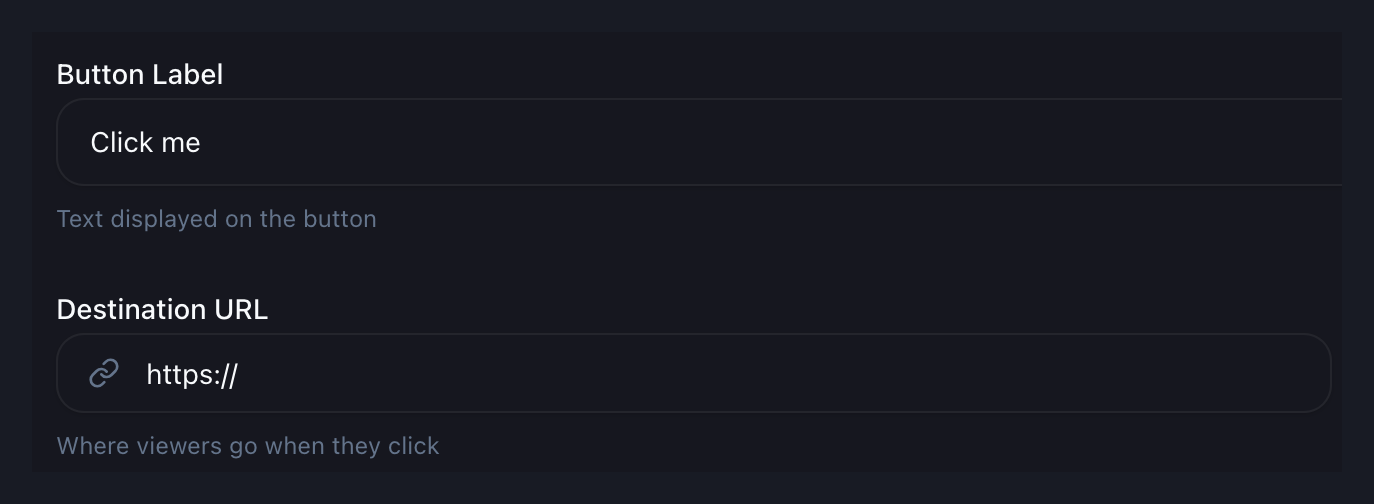
The configuration example uses sample text, “Click me,” and an incomplete URL. These are not recommended campaign copy or a working destination. Replace sample values with the wording and final address from your specification before testing.
Timing is a separate decision. Choose a moment consistent with the video’s request, then test that configured moment in playback. This implementation check is different from deciding which point in the story should carry the offer.
Test the experience the viewer will actually encounter
A configuration screen cannot confirm the full experience. Test the video on its intended page, then follow the action through to the destination. Use a visitor session rather than relying only on an account that already has administrative access.
- Check the request against the recording. Confirm that narration and on-screen wording still describe the current offer. A later URL change can leave the video promising something else.
- Play through the interaction. Confirm that the action appears as intended and remains understandable beside the video content. Do not assume a saved setting proves the viewing experience.
- Activate the actual link. Check the final destination, including any redirects. Confirm that visitors can access the promised next step without an unexplained sign-in or missing page.
- Check a smaller screen and keyboard interaction. Inspect legibility, reachability and the ability to identify and use the action. Record problems rather than assuming the player or page meets every accessibility requirement.
- Complete the next step safely. Where appropriate, use a clearly identified test submission and coordinate with the person receiving it. Confirm the destination’s response, not merely that the first page loaded.
These are checks to perform on your chosen setup, not guarantees about browser behavior or features supplied by a particular player. If a check fails, fix or reconsider the path before treating the CTA as ready.
Verify click records without confusing them with completion
Vidzy includes CTA click tracking. Before relying on the records in a report, establish the applicable measurement definition and check the expected behavior with a controlled test. Do not assume that a click count represents unique people, a completed registration or a sale.
Keep the immediate interaction and the destination’s completion evidence separate. If the request is to read a resource, arriving at it may be the relevant next step. If it is to submit an inquiry, the click and the submission answer different questions. Obtain completion evidence from the system responsible for that action; do not assume an automatic connection between systems.
For the implementation handoff, record the test date, video version, destination and what was observed. This creates a reference for investigating a later failure without turning one test into a performance benchmark.
Give the CTA an owner after launch
Recheck the path when an offer closes, a resource moves, a page is redesigned or the video is replaced. Decide who receives those changes and who confirms that the request still makes sense. A working URL can still point to an outdated promise.
Before preparing your next video CTA, complete the specification for one action and ask someone else to follow it from playback to destination. Have them describe what they expected and what happened. Resolve any mismatch before interpreting campaign results.