
Tag: Video Marketing

  • Branded Video Player: Match Your Page Without Hiding Playback

    Branded Video Player: Match Your Page Without Hiding Playback

    A video player can use your brand color and still feel wrong on the page. Its play button may disappear against the opening frame, compete with a nearby action, or look like decoration rather than something a visitor can use.

    The goal of a branded video player is not to customize every available setting. It is to make the viewing experience belong on the page while keeping playback recognizable. Start with a small visual brief, compare a few treatments in context, and check the result before calling the design finished.

    What is a branded video player?

    A branded video player is a player whose visual treatment has been adapted to fit a brand or website. That might mean choosing an overall skin or changing the play button’s appearance. The exact controls available depend on the product; “customizable” does not mean every element can be changed.

    Separate the player from the footage inside it. A branded title sequence is part of the video. A play button or surrounding player treatment is part of how people encounter that video. You can assess the two together without treating them as the same design task.

    Also keep appearance separate from hosting, access control and provider-branding removal. A player that fits your palette does not automatically establish any of those capabilities. If they matter to the project, evaluate them as separate requirements.

    Write a visual brief for the actual page

    Before choosing a skin, look at the page where the video will appear. Note its background, the nearby text and buttons, and the role of the video. A treatment that looks restrained in a gallery can become difficult to distinguish on a similarly colored page.

    Record three decisions:

    • What should feel consistent? Identify the page’s visual character, such as a quiet neutral surface with one accent. Do not assume every brand color belongs in the player.
    • What should stand out? The start of playback needs to be recognizable. Decide how it can be noticeable without visually overpowering the video’s subject.
    • What can remain standard? Familiar-looking playback elements may serve the reader better than a highly decorative treatment. Customize only where there is a clear reason.

    Keep a screenshot of the intended page beside the candidate player treatment during review. This gives the team a shared reference and avoids approving the player in isolation, then discovering that it clashes with the finished page.

    Preserve the invitation to press play

    The play control has a job before it has a brand style. A visitor should be able to identify it against the surrounding surface and understand that it starts the video. A pale icon on a pale button, or a dark button over a dark frame, deserves closer inspection even when both colors belong to the brand palette.

    Review the symbol and its background separately. A button can stand out from the video while the symbol inside it remains hard to see. Likewise, a legible symbol does not help much if the entire control is difficult to locate.

    W3C’s media-player accessibility guidance includes keyboard support, visible focus, clear labels and sufficient contrast between text, controls and backgrounds. These are evaluation requirements, not a claim that a particular skin or color choice makes an entire player accessible.

    Compare Vidzy player skins without assuming extra controls

    Vidzy provides an embeddable, customizable player experience with player skins and play-button style and color customization. Those options are relevant when you want the player treatment to fit the surrounding page.

    The useful comparison is not how many styles are available. It is which treatment supports your page’s visual brief while keeping the start of playback recognizable. Compare the relationship between the play symbol, its background and the rest of the player.
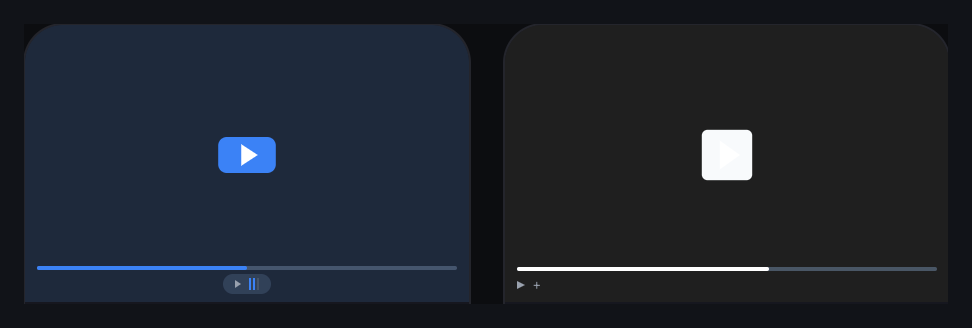
    Two Vidzy player-skin previews with blue and monochrome play-button treatments
    Two previews cropped from Vidzy’s skin gallery. Account details and unrelated controls are excluded; the original visual treatments are preserved.

    These previews are starting points for review, not an accessibility endorsement. In the monochrome example, the light play symbol against a light button deserves particular attention before use. Judge the actual rendered result rather than assuming a gallery preview has passed every usability check.

    Player skins and play-button customization do not imply that you can independently change every control, add any visual asset or reproduce an arbitrary design. Keep the requested treatment within the options you have verified for your own setup.

    Test the treatment against different visual conditions

    Use the actual opening frame and page background when comparing candidates. If the player appears over changing footage during an interaction, review the relevant moments too. A design approved against an empty dark preview may behave visually quite differently beside detailed imagery.

    These hypothetical examples show how a visual brief can guide the decision:

    • A bright product demonstration on a white page: check whether a light player treatment leaves the play control difficult to identify. A stronger accent may be worth testing, but assess the symbol’s contrast as well as the surrounding button.
    • A restrained professional-services page: a vivid treatment might compete with the explanation. Try a quieter skin while preserving a clear playback invitation.
    • A colorful educational page: matching every accent may add noise. Choose one visual relationship to carry through, such as the main accent, and leave the rest uncomplicated.

    None of these choices guarantees more plays or better business results. They are design hypotheses to inspect in context, not universal prescriptions for a particular audience or industry.

    Review the real embed at smaller sizes

    Place the candidate on its intended page before sign-off. Reduce the viewport and check the full player boundary, not just the central play button. The player should fit the content area without requiring horizontal scrolling or clipping important controls.

    Check whether the play symbol remains easy to identify, nearby page elements collide with the player, or the caption and supporting explanation become separated from it. If the layout breaks, investigate the page and embed configuration rather than trying to disguise the problem with a different color.

    Then review keyboard interaction, visible focus and enlarged-page viewing in the chosen implementation. Styling and functionality need separate checks. A static screenshot can show a visual treatment; it cannot prove that the live player is usable with different input methods.

    Make the approved treatment easy to review again

    Keep a short design record with the chosen skin, the intended play-button treatment, a reference page capture and any unresolved checks. Record what the team approved rather than relying on a description such as “the blue one.” This can be an ordinary project document; it does not require a player-specific approval feature.

    Revisit that reference when the page background, brand palette or video’s opening changes. The same treatment may need another review in a different context. Do not assume that a previously acceptable combination remains equally clear everywhere.

    For your next embedded video, choose one candidate treatment and review it beside the finished page at a wide and a narrow width. Keep the changes that help the player belong, and remove the ones that make playback harder to recognize.

  • YouTube Embed vs a Marketing Video Player for Landing Pages

    YouTube Embed vs a Marketing Video Player for Landing Pages

    The choice between a YouTube embed and a marketing video player is not really about which player is universally better. It is about what the video must do on a particular page.

    A standard YouTube embed may be enough when you want a straightforward way to place a YouTube video on a site. A marketing-focused player becomes more relevant when the page needs a controlled visual treatment, an in-player next step, lead capture, or viewer-behavior evidence tied to the embedded experience.

    You may not need to choose between YouTube hosting and a marketing player at all. Some players can use a YouTube video while changing the experience presented on your page. That makes hosting and presentation two separate decisions.

    Which option should you choose?

    Choose a standard YouTube embed if YouTube’s documented embed controls meet your requirements and its player presentation suits the page. Evaluate a marketing-focused player if the video must perform a defined job beyond playback, such as presenting a timed call to action, collecting an email address, or giving your team specific on-page viewing signals.

    Use requirements rather than assumptions:

    Decision criteria for a standard YouTube embed and a marketing-focused player
    Criterion Standard YouTube embed Marketing-focused player to evaluate
    Primary job Place a YouTube video or playlist on a website or blog. Shape the embedded video around a specific on-page marketing journey.
    Hosting The embedded content remains on YouTube. Depends on the product. Vidzy can use an existing YouTube video without moving its hosting.
    Playback controls YouTube documents parameters for controls, autoplay, captions, looping, start time, and JavaScript API access. Confirm that the product supports the exact playback and design controls your page needs.
    Brand presentation YouTube controls its branding treatment; the former modestbranding parameter is deprecated and has no effect. Evaluate player styling, visible platform elements, and the degree of brand control. Vidzy supports a branded, customizable player.
    Next action Define separately what should happen around or after playback; this article does not treat YouTube’s embed documentation as a complete inventory of action features. Verify the exact in-player action required. Vidzy supports timed, clickable calls to action and links to arbitrary destinations.
    Lead capture Assess the full page workflow rather than assuming the embed itself supplies your required form. Vidzy supports timed email opt-ins and lead gates. Confirm that this is appropriate for the viewer journey.
    Viewer evidence Decide which questions you need the data to answer and verify the relevant reporting documentation. Vidzy supports watch-time tracking, drop-off analysis, heatmaps, CTA click tracking, opt-in tracking, and replay tracking.

    The right-hand column is not a promise about every marketing player. It identifies capabilities to verify. Confirm the product’s metric definitions, available controls and applicable plan before committing to a workflow.

    Start with the landing page’s job

    Before comparing software, write one sentence that defines the video’s role. For example:

    • Explain the product clearly enough for a visitor to request a demo.
    • Show a tutorial, then direct an interested viewer to the relevant guide.
    • Introduce a gated resource and collect an email address at an appropriate point.
    • Let visitors watch a public YouTube video without adding another marketing workflow.

    These jobs do not require the same player. If playback is the entire requirement, adding conversion features can create work without solving a problem. If the video has a defined next step, treating the player as a passive rectangle may leave the page team dependent on surrounding copy and buttons.

    Also distinguish the page goal from the distribution goal. YouTube has its own recommendation surfaces, as described in its official recommendation guidance. Publishing for discovery on YouTube and designing an embedded landing-page experience are related, but they are not the same task.

    When a standard YouTube embed is a sensible choice

    YouTube provides an established, documented path for embedding a video or playlist: copy the embed HTML and add it to a website or blog. Its iframe player also supports parameters for needs such as displaying controls, autoplay, captions, looping, a start point, and JavaScript API access. The precise behavior and implementation requirements are maintained in the official YouTube embedded-player documentation.

    A standard embed may be a better fit when:

    • The video is already on YouTube and straightforward playback is the main requirement.
    • The available YouTube player parameters cover the controls you need.
    • You are comfortable using YouTube’s player treatment on the page.
    • Your next action already works well elsewhere on the landing page.
    • Your team does not have a defined use for additional in-player interaction or viewing evidence.

    YouTube also documents a Privacy Enhanced Mode for website embeds. It uses the youtube-nocookie.com domain and prevents views in that mode from influencing a viewer’s YouTube browsing experience or personalized advertising in the ways described by YouTube. Read the exact scope and implementation notes in YouTube’s embedding guidance. It should not be summarized more broadly as a guarantee that no data handling or compliance work is required.

    Where embed parameters stop being a branding strategy

    Player parameters can alter supported playback behavior, but they should not be mistaken for unlimited presentation control.

    Two details are particularly useful when reviewing older YouTube embed advice:

    • The modestbranding parameter is deprecated and has no effect. YouTube says its player determines the appropriate branding treatment based on several signals.
    • Setting rel=0 does not disable related videos. YouTube documents that related videos will instead come from the same channel.

    Those facts do not make a YouTube embed unsuitable. They clarify the boundary of what its current parameters can promise. If a landing page requires a more controlled player presentation, record that as a selection requirement and evaluate products designed around it.

    When a marketing-focused player deserves evaluation

    A marketing-focused player is worth considering when the player itself must participate in the visitor journey. The key is to name the required behavior instead of shopping from a broad feature list.

    You need an action at a particular moment

    If the video builds toward a specific next step, an in-player CTA may connect that action to the relevant moment. Vidzy supports timed, clickable calls to action and can link a CTA to an arbitrary destination.

    This capability does not guarantee more clicks or conversions. The offer, wording, timing, audience, and destination still matter. Choose it because the workflow requires a contextual action, not because a button alone proves effectiveness.

    You need lead capture within the viewing flow

    For videos that justify an email request, Vidzy supports timed email opt-ins and lead gates. Before using either, decide what value the viewer receives, why the request appears at that point, and what happens after submission.

    A form outside the player may still be better when it needs more explanation, when the video should remain freely accessible, or when your existing page workflow already performs the task cleanly.

    You need evidence tied to viewer behavior

    Vidzy provides video analytics, including watch-time tracking, drop-off analysis, heatmaps, CTA click tracking, opt-in tracking, and replay tracking. These signals can help teams identify what happened around the video and decide what to investigate next.

    They do not prove why a viewer behaved a certain way or that the video caused a business outcome. Before comparing tools, define the question, confirm each metric’s applicable definition, and determine whether your wider workflow can connect player events to the intended outcome.

    Separate video hosting from player choice

    “YouTube or a marketing player” can be a false choice. Hosting answers where the video file and platform content live. The embedded player answers what the visitor encounters on your page.

    Vidzy supports YouTube videos while allowing the video to remain hosted with the existing provider. That means a team can keep its YouTube workflow and evaluate a different embedded experience for selected landing pages.

    This approach may be relevant when:

    • You still want the video available on YouTube.
    • You do not want a player evaluation to become a hosting migration.
    • Only certain high-intent pages need a more controlled or interactive experience.

    Confirm the exact operational workflow before adopting any tool. A feature can fit the landing-page goal while still creating unacceptable review, accessibility, analytics, or maintenance work for the team.

    Use this checklist before switching players

    1. State the video’s job. Define the audience, page, message, and intended next step.
    2. List must-have player behavior. Separate playback controls from branding, CTAs, lead capture, and analytics.
    3. Verify current documentation. Do not rely on an old tutorial for embed parameters or on a comparison page for a competitor’s current features.
    4. Decide whether hosting must change. Ask whether the new player can use the source you already maintain.
    5. Review the whole journey. Check the message before the video, the action in or around it, and the destination after a click or submission.
    6. Define useful evidence. Specify what you will learn from each event or viewing signal before collecting more data.
    7. Test implementation quality. Review the real embed across relevant devices and check accessibility, consent, playback, and destination behavior.

    If the standard YouTube embed satisfies that checklist, keeping it may be the more proportionate choice. If the checklist identifies a need for controlled presentation, timed actions, lead capture, or the listed viewer-behavior signals, a conversion-focused video player such as Vidzy is more relevant to evaluate.

    Write the requirements first, then compare the live products against them. That produces a defensible decision even if the answer is to keep the player you already use.

  • What Is a Conversion-Focused Video Player?

    What Is a Conversion-Focused Video Player?

    You have a video, a website, and something you want visitors to do. A player described as “conversion-focused” sounds relevant, but the label leaves an important question unanswered: which part of that job does the software actually handle?

    Understanding the boundary helps you evaluate features without expecting the player to fix the offer, explain the product, or complete the visitor’s entire journey. It also helps you avoid paying attention to capabilities you have no reason to use.

    What is a conversion-focused video player?

    A conversion-focused video player is a video player designed to support a marketing task around playback. That can include shaping the player’s appearance, presenting a call to action, requesting contact information, or recording viewing and interaction signals.

    In this guide, the term describes the player’s intended role. It is not a promise that installing one will increase conversions, nor a guarantee that every product offers the same features.

    The useful distinction is between making video available to watch and equipping the viewing experience for a specific task. A product demonstration might need a link to a detailed specification. An educational recording might support an email request. An informational video might need no interaction at all.

    Where the player’s responsibility begins and ends

    Separate the work into three parts before evaluating software:

    • Video source and hosting: where the video is maintained and made available for playback.
    • Player experience: how visitors encounter playback and any supported presentation, interaction, or reporting features.
    • Destination and follow-up: what happens after a click or contact request, including the page, form, offer, and work needed to respond.

    These responsibilities can sit in different systems. A player evaluation does not automatically mean a hosting migration, and a clickable action does not mean that the destination or follow-up has been configured.

    For example, a video can offer a link to a booking page. The booking page still needs to explain the appointment, work correctly, and collect the information your team needs. The player supplies one part of that experience.

    Four capability families to understand

    Use these families to describe a requirement. Verify the exact behavior in each product you consider; a broad feature label is only a starting point.

    Presentation that fits the surrounding page

    Player appearance matters when your team needs the video experience to fit a particular brand treatment. Useful requirements might concern the play button’s style or color and the overall player skin.

    Be specific about what needs changing. “Customizable” does not tell you which elements you can edit, and a suitable color scheme does not establish that the controls are easy to use.

    A relevant action around the video

    A call to action gives a viewer a next step, such as opening a product guide or visiting a registration page. Timing can be a requirement when the request relates to something explained during the video.

    The important buying question is whether the player supports the action you need. The exact copy and moment deserve their own editorial decisions after the capability is established. Adding several actions is not inherently more useful than providing one clear option.

    Contact capture where it serves the task

    An email request or lead gate may be relevant when there is a clear reason for the viewer to share contact information. That reason should be understandable before your team starts configuring a form.

    Evaluate capture and follow-up separately. A form’s presence does not establish how submissions reach the person responsible for responding, which fields are supported, or whether another system is involved. Verify those details for the workflow you intend to use.

    Evidence about viewing and actions

    Reporting can help answer questions such as whether viewers watched the video or used an available action. Choose the question first, then identify which reported signal could answer it.

    Ask what a metric counts, which period it covers, and what context is available. A recorded click is evidence of an interaction; it does not establish that a booking, purchase, or useful conversation followed.

    What this looks like in practical use

    The following are hypothetical planning examples, not customer results.

    A demonstration with a detailed next step

    A team has a short demonstration and a separate technical specification. It needs a way for interested viewers to open that specification while the subject is relevant.

    The requirement is a clickable action with an appropriate destination, plus timing if the action should appear alongside a particular explanation. The team still owns the specification’s accuracy and whether it answers the viewer’s next question.

    An educational video connected to a resource

    A creator has a lesson and an accompanying resource. Before adding contact capture, the creator decides what a viewer receives and how the request will be handled.

    The player requirement may be an email opt-in. Resource delivery and subsequent communication need their own verified process. If that process is not ready, adding the request would introduce an unfinished step.

    A video whose job ends with understanding

    A business embeds an explanation of a routine process. There is no useful action to request inside the video; the surrounding page already contains the necessary information.

    In this case, presentation and playback may be sufficient. A conversion-focused product can still be evaluated for relevant capabilities, but there is no reason to add a gate or CTA simply because one is available.

    Turn feature claims into acceptance tests

    A useful evaluation produces observable answers. Write a short test for each essential requirement and record whether it passed, failed, or still needs investigation.

    Example acceptance tests for a marketing video-player evaluation
    Requirement What to test What remains separate
    Use an existing video Try the actual source you intend to use and confirm playback on the intended page. Source permissions, hosting arrangements, and ongoing source maintenance.
    Match the visual treatment Apply the required supported styling and inspect the resulting player. The surrounding page design and accessibility evaluation.
    Offer a contextual next step Check that the intended action appears and opens the correct destination. The destination’s content and whether the visitor completes its task.
    Request contact information Use a test submission to verify the configured request and how your team retrieves the response. Resource delivery, consent arrangements, and follow-up responsibilities.
    Answer a reporting question Perform a known test action and inspect the relevant report using its documented definition. Business outcomes or attribution that the report does not establish.

    This table is an evaluation method, not a statement that every player supports every row. Omit requirements that do not serve your use case, and investigate any essential behavior that remains unclear.

    Include implementation quality in the decision

    Test the actual experience your visitors will encounter, including relevant devices and page layouts. Previewing an attractive player alone is not enough to validate its fit.

    Accessibility deserves a specific check. W3C’s media-player accessibility guidance identifies keyboard support, visible keyboard focus, clear labels, and sufficient contrast as important player functions. Use those criteria when evaluating a candidate. They are not claims that Vidzy, or any other player discussed here, has passed an accessibility assessment.

    Also decide who maintains the configuration. A destination can change, a resource can become outdated, or a video can be replaced. Assign responsibility for checking that the experience still matches the page’s promise after those changes.

    How Vidzy fits this category

    Vidzy is an embeddable video player focused on marketing and conversion use cases. It supports YouTube and Vimeo video URLs and MP4, and allows video to remain hosted with the existing provider.

    Its capabilities include player skins, play-button style and color customization, timed clickable CTAs, timed email opt-ins, and lead gates. Vidzy also provides video analytics, including watch-time tracking, drop-off analysis, and CTA click tracking. It supports HTML embedding.

    For the demonstration example, a Vidzy workflow can combine a supported video source, a player skin, and a timed CTA pointing to the relevant specification page. CTA click tracking can provide evidence about use of that action. Your team still needs to verify the configured experience and evaluate what visitors do at the destination.

    That is a capability-level example, not a complete installation guide. It does not assume particular form fields, metric calculations, automatic follow-up, or a measured conversion improvement. Those details should never be inferred from the category label.

    Common mistakes when evaluating a player

    • Buying from the feature count: A feature matters when it addresses a requirement you can explain and test.
    • Confusing capture with follow-up: Establish who receives a request and what they do with it.
    • Treating a report as proof of impact: Check which behavior it measures and which business question remains unanswered.
    • Expecting the player to repair the message: The video’s explanation, the offer, and the destination still need to make sense.
    • Accepting vague implementation answers: Record unresolved behavior before committing to a workflow that depends on it.

    Choose one video and write down the specific capability missing from its current experience. Then define an observable test for that requirement. If presentation, timed actions, email capture, or viewing evidence is relevant, explore Vidzy’s conversion-focused video player against that test.

  • Creating an Effective Video Marketing Funnel

    Creating an Effective Video Marketing Funnel

    A collection of marketing videos is not automatically a video funnel. The funnel begins when each video serves a defined audience need and leads to a deliberate next decision.

    Without that structure, every video tends to do too much. An introductory video tries to explain the product, answer objections, collect an email, and close the sale. Its call to action points wherever the team needs traffic that week. The dashboard reports activity, but nobody can say which part of the journey the video was meant to improve.

    A practical video marketing funnel fixes the planning problem first. Instead of starting with a list of videos to produce, start with the decisions a potential customer must make. Then give each video one job, one next step, and one evidence plan.

    What is a video marketing funnel?

    A video marketing funnel is a connected journey in which videos help people move from one level of understanding or intent to another. A video can introduce a problem, explain an approach, demonstrate a solution, address a concern, or help a ready buyer take action. Its place in the funnel depends on the decision it supports, not simply its format or length.

    The word “funnel” can suggest that every person enters at the top and follows the same narrow path. Real journeys are less orderly. Someone may first encounter a detailed product demonstration because a colleague shared it. Another person may watch an educational video, leave, and return later through a different page.

    That is why the useful unit of planning is not a rigid stage label. It is a four-part connection:

    1. Audience state: What does this viewer understand, need, or question now?
    2. Video job: What useful change should the video make in that state?
    3. Next step: What is the most proportionate action after that change?
    4. Evidence: What behavior would help you evaluate whether the connection worked?

    If you cannot describe all four parts, the video may still be useful, but its role in the funnel is not yet clear.

    Build backward from the final decision

    Begin with the final decision your journey is designed to support. It might be starting a trial, requesting a consultation, choosing a plan, registering for an event, or making a purchase. Name the real decision rather than using a vague goal such as “drive engagement.”

    Then work backward:

    1. What must a person understand or trust immediately before making that decision?
    2. What questions would prevent that understanding?
    3. What earlier problem or opportunity would make those questions relevant?
    4. Where can video explain, demonstrate, or reassure more effectively than surrounding copy alone?

    This exercise prevents the common mistake of producing videos first and inventing a funnel around them afterward. It may also show that some steps do not need video. A short comparison table, calculator, product page, or direct conversation may be the better tool.

    Map stages to reader needs, not content clichés

    Awareness, consideration, and decision are useful labels, but they should describe changes in the viewer’s situation. Do not assume that a particular format always belongs to a particular stage.

    A decision-led map for a video marketing funnel
    Journey stage Viewer’s immediate need Possible video job Proportionate next step Evidence to review
    Problem recognition Understand a problem and decide whether it matters Clarify the cost, mechanism, or missed opportunity Explore a deeper guide or relevant example Playback starts, viewing patterns, and movement to the next resource
    Approach evaluation Compare possible ways to solve the problem Explain criteria, tradeoffs, and suitable contexts Review an implementation guide, demonstration, or comparison Attention around key criteria and use of the offered next step
    Solution evaluation See whether a specific solution fits Demonstrate the relevant workflow or answer a material objection Inspect the product, request more detail, or begin evaluation Viewing of decisive sections and measurable action around the video
    Decision Confirm fit and understand the immediate commitment Resolve the remaining question without reopening the whole pitch Take the defined commercial or operational action Completed next steps and downstream outcomes from the wider journey

    The examples are prompts, not universal rules. A demonstration can create initial awareness when the audience already knows the problem. An educational walkthrough can support a late-stage decision when the final concern is technical understanding. Place the video according to the viewer’s question.

    Give each video one primary job

    A video may produce several useful effects, but it needs one primary job for planning and evaluation. Choose a verb that describes the intended change:

    • Recognize a costly problem
    • Understand a method
    • Compare two approaches
    • See a workflow in context
    • Resolve a specific objection
    • Prepare for a sales or onboarding conversation

    “Engage the audience” is too broad. “Help a landing-page marketer understand why player choice affects the on-page viewing experience” is specific enough to shape the script, placement, CTA, and evidence plan.

    One primary job also makes editing easier. If a section does not help produce the intended change, move it to another asset or remove it. That discipline usually creates a clearer path than asking one long video to serve every stage.

    Choose the next step after the video earns it

    The next step should match the amount of clarity and intent the video has created. An early educational video may reasonably offer another guide. A detailed evaluation video may support a product review or conversation. A request for contact information makes sense only when the viewer can understand the value of the exchange.

    For each video, write the CTA as a continuation of the viewer’s task:

    • “See the full comparison” continues an evaluation.
    • “Watch the setup walkthrough” continues implementation research.
    • “Get the worksheet” continues a planning exercise.
    • “Review the product” continues solution evaluation.

    Avoid making every next step a sale. If the video has only established the problem, an immediate high-commitment request may skip the questions the viewer still needs answered.

    Design branches instead of forcing one sequence

    Your funnel should accommodate people who enter with different levels of knowledge. A first-time visitor may need context. A referral may already understand the category and want proof of fit. A returning prospect may need only one answer.

    Map at least three paths:

    1. Primary path: the most common sequence you expect.
    2. Fast path: a route for viewers who already have enough context.
    3. Recovery path: a useful alternative for someone who is not ready for the primary CTA.

    This is not an argument for filling every video with buttons. Too many competing actions weaken the decision. Keep one primary action, then use the surrounding page or follow-up experience for reasonable alternatives.

    Measurement tools also distinguish between open and closed funnel models. Google Analytics, for example, documents that its Funnel exploration can represent steps in a user journey and can be configured so people either enter at any step or must enter at the first step. Those are GA4-specific reporting definitions, but the distinction is a useful planning reminder: decide whether your journey genuinely requires a fixed entry point before evaluating its results. See the official GA4 Funnel exploration documentation for its precise behavior.

    Define the evidence before launch

    Do not wait for a dashboard to decide what success means. Write the evidence plan beside the funnel map before publishing each step.

    Use four layers:

    1. Opportunity: Did the intended audience encounter the page and have a reasonable chance to play the video?
    2. Attention: Did viewing behavior suggest that people reached the section required for the video’s job?
    3. Action: Did viewers use the defined CTA, opt-in, or other measurable next step?
    4. Outcome: Did the wider journey produce the business or operational result you actually care about?

    These layers should not be collapsed into one verdict. Watch time does not prove understanding. A click does not prove that the destination delivered. A completed outcome does not, by itself, prove that the video caused it.

    Record metric definitions, date ranges, traffic context, video versions, and known gaps before comparing results. If the system cannot measure a transition reliably, name that limitation instead of filling it with an assumed rate.

    How Vidzy can support an embedded-video step

    Vidzy is an embeddable, conversion-focused video player. It supports timed, clickable calls to action that can send viewers to a chosen destination. It also supports timed email opt-ins and lead gates when lead capture is an appropriate part of the journey.

    For evaluation, Vidzy provides video analytics, including watch-time tracking, drop-off analysis, CTA click tracking, opt-in tracking, and replay tracking. These capabilities can supply evidence around an embedded-video step, but they do not design the funnel, diagnose viewer motivation, or prove that the video caused a downstream outcome.

    Start with the journey map. Then evaluate which player capabilities are required at each embedded-video step. The tool should implement a deliberate path, not substitute for one.

    Common video-funnel mistakes

    • Starting with formats: “We need a webinar and three short videos” is a production list, not a journey.
    • Giving every video the same CTA: One destination rarely matches every level of viewer intent.
    • Making each step a sales pitch: Early-stage viewers often need clarity before commitment.
    • Assuming a linear path: Referrals, returning visitors, and experienced buyers may enter later.
    • Measuring attention as an outcome: Viewing evidence and business results answer different questions.
    • Changing the whole funnel at once: Multiple simultaneous changes make the useful lesson harder to identify.
    • Ignoring the destination: A clear video CTA cannot repair a page that breaks the promise or adds unnecessary friction.

    Use this video-funnel mapping worksheet

    Run this exercise with one customer journey before planning new production:

    1. Write the final decision in one sentence.
    2. List the questions a person must resolve immediately before that decision.
    3. Work backward until you reach the earliest problem or opportunity.
    4. Mark the places where video is the clearest medium.
    5. Give each selected video one audience state and one primary job.
    6. Choose one proportionate next step for each video.
    7. Add a fast path and a recovery path where they are genuinely useful.
    8. Define opportunity, attention, action, and outcome evidence.
    9. Confirm what your tools actually measure before setting expectations.
    10. Publish the smallest coherent path, observe it, and revise one meaningful connection at a time.

    The result should fit on one page. If the map requires a complicated diagram to explain who should watch what next, simplify the journey before producing more videos.

    Video marketing funnel FAQs

    How many videos should a video marketing funnel have?

    There is no required number. Use enough videos to answer the material questions in the journey where video is genuinely the right medium. A short path with two focused videos can be more coherent than a large library with unclear transitions.

    Can one video serve more than one funnel stage?

    Yes, especially when audiences enter with different levels of knowledge. Give the video one primary job, then check whether its placement, introduction, and next step still make sense in each context. Do not assume the same CTA suits every placement.

    What should you measure in a video funnel?

    Measure the opportunity to view, attention around the video’s intended job, use of the defined next action, and the wider journey’s outcome. Keep those layers separate and document how each measure is calculated before interpreting changes.

    Map one journey before adding another video. Once the audience state, video job, next step, and evidence are clear, review Vidzy’s approved player capabilities and decide whether they fit the embedded steps you designed.

  • Gated Video: When to Ask Viewers for an Email

    Gated Video: When to Ask Viewers for an Email

    A gated video asks a viewer to complete an action—often entering an email address—before they can start or continue watching. That creates a clear exchange: the viewer gives you information, and you provide access to content they expect to be worth the interruption.

    The form is the easy part. The harder decision is whether the video earns the right to ask.

    Gate too early or without a clear promise, and interested viewers may leave before they understand the value. Leave every video open, and you may miss a useful opportunity to identify people who want a deeper resource. The right choice depends on the video’s job, the audience’s existing intent, and what happens after someone submits.

    What is gated video?

    Gated video is video content whose access is connected to a viewer action. In a marketing context, that action is commonly an email submission. The request may appear before playback, after a preview, or at another point in the viewing experience.

    A gate is different from a normal video call to action. A CTA offers a next step, such as visiting a page, while the viewer can continue watching. A gate makes access to some or all of the video conditional on the requested action. That difference changes the viewer’s decision and deserves its own strategy.

    Should you gate the video or leave it open?

    Gate a video when the content offers specific value that the intended viewer can understand before submitting, the email request is proportionate to that value, and your team has a useful follow-up plan. Leave it open when reach, trust, education, or easy product understanding matters more than identifying each viewer.

    Signals that favor an open or gated video experience

    Decision signal Open access is more suitable A gate may be suitable
    Primary goal Reach, education, product understanding, or easy sharing Access to a focused resource and an intentional follow-up
    Viewer context The audience is early in its research or unfamiliar with your value The audience already understands the problem and wants deeper help
    Content value The video explains information readily available elsewhere The video provides a distinctive workshop, training session, demonstration, or resource
    Follow-up No relevant email journey or next resource is ready The viewer can receive a clear, relevant continuation
    Cost of friction Losing anonymous viewers would undermine the video’s main purpose The value of identifying interested viewers justifies a deliberate access step

    This is not a scoring formula. A webinar replay may be a strong gated asset for one campaign and an open educational resource for another. Start with the job the video performs in that particular journey.

    Use four tests before adding an email gate

    1. Can the viewer understand the promise?

    Before asking for information, explain what the viewer will get. A title such as “Product Workshop” is vague. A more useful promise identifies the audience, the problem, and the expected takeaway without exaggerating the result.

    The surrounding page should answer practical questions: What does the video cover? Who is it for? How long or detailed is the experience? What becomes available after submission? If the viewer cannot assess the offer, the form asks for trust before giving them enough evidence.

    2. Is the value distinctive enough?

    Basic definitions and short awareness videos are usually easier to leave open. They help people discover your point of view and decide whether deeper material is relevant. A gate becomes easier to justify when the content provides substantial, specific help: a detailed workshop, original analysis, a useful template demonstrated in context, or training that solves a defined problem.

    Do not confuse production cost with viewer value. An expensive video can still answer a common question, while a simple screen recording can contain exactly the process a specialist needs.

    3. What does the interruption cost?

    Every gate creates another decision. Before playback, the viewer must decide based on the page’s promise. Mid-video, they must decide whether the value already received makes the remaining content worth the exchange. Near the end, the request reaches fewer people but can follow a fuller demonstration of expertise.

    Consider what you give up if someone declines. If the video’s main purpose is to explain your product to uncertain visitors, blocking that explanation may work against the page. If the video is a deeper resource promoted to an audience that already requested the topic, the trade can be more coherent.

    4. Is there a responsible next step?

    A form submission should begin a relevant experience, not merely add a row to a list. Decide what the viewer receives, which message follows, who is responsible for the data, and how the person can understand what they are signing up for.

    If your team has no clear use for the email beyond collecting it, leave the video open until the follow-up is ready. More submissions are not automatically more useful leads.

    Where should an email request appear?

    Placement determines how much evidence the viewer receives before the request and how much content remains afterward. Choose it from the value sequence, not from a universal timestamp.

    Before playback

    A pre-video gate asks for the highest level of trust because the viewer has not yet experienced the content. It fits best when the surrounding page, source of the visit, speaker, agenda, or known resource already makes the value concrete.

    It is a weaker fit for a short introduction, a public product explanation, or a video intended to build initial trust. In those cases, the gate can block the very evidence that would make the request reasonable.

    After a useful preview

    A gate placed after an open section lets the video demonstrate relevance first. The preview should deliver real value, establish what comes next, and stop at a natural boundary. It should not feel like an arbitrary interruption halfway through a sentence or demonstration.

    This approach can suit a longer workshop or lesson with a clear transition from overview to detailed application. Avoid stretching the opening merely to delay the form; the preview still needs to respect the viewer’s time.

    At or near the end

    An end-of-video email request leaves the main content open and invites interested viewers into a related next step. Strictly speaking, it may function more like lead capture than an access gate because the viewer has already received the video.

    Use it when the follow-up resource is the exchange: a worksheet, another lesson, updates on the topic, or a relevant conversation. The request should explain that next value rather than implying the viewer must submit to finish content they have effectively completed.

    Which videos are reasonable candidates for gating?

    Video type alone does not decide the answer, but it helps expose the likely tradeoff.

    • On-demand workshops and detailed training: Potentially strong candidates when the agenda and practical outcome are clear.
    • Webinar replays: Consider the audience source and whether the replay is a campaign asset or an open educational resource.
    • Research presentations: A gate may fit when the material is distinctive and the viewer understands what evidence is included.
    • Product demonstrations: Be cautious. If buyers need the demonstration to understand the product, open access may support their decision better.
    • Short explainers and awareness videos: Usually weak candidates because the request can outweigh the amount of value offered.
    • Customer stories: Open access often makes the proof easier to encounter and share; add a separate next step if appropriate.

    The strongest question is: “Would the intended viewer reasonably choose this exchange with the information available before the form?”

    Design the email request for clarity and accessibility

    Keep the form proportionate to the immediate purpose. The W3C Web Accessibility Initiative’s forms guidance recommends asking users only for information required to complete the process and providing labels that identify form controls. Its form-instructions guidance also recommends explaining required and optional inputs, expected formats, and other relevant instructions.

    Apply those principles to the complete viewing experience:

    • Use a visible, descriptive label for the email field.
    • State which fields are required without relying on color alone.
    • Explain what submitting unlocks and what communication follows.
    • Keep essential instructions visible rather than relying only on temporary hint text inside the field.
    • Test keyboard navigation, focus behavior, validation messages, and playback continuation.
    • Review the experience on the devices and page layouts your audience actually uses.

    Accessibility and privacy responsibilities extend beyond the player. Review the surrounding page, data handling, consent language, and follow-up process under the requirements that apply to your organization and audience.

    Measure the decision, not just the form

    A submission count tells you how many recorded submissions occurred under the measurement system’s rules. It does not tell you how many people would have watched without the gate, whether the addresses are useful, or whether the follow-up served the viewer.

    Evaluate the gate across the whole path:

    1. Opportunity: How many relevant visitors reached the video experience?
    2. Gate behavior: How many submitted, declined, or left at the request?
    3. Viewing behavior: Did people who submitted continue into the promised content?
    4. Follow-up: Did the next message or resource match the promise?
    5. Outcome: Did the journey produce the business result you defined?

    Define each metric before comparing it, and avoid turning a form fill into proof of purchase intent. If you test an open and gated experience, keep the audience, page, video version, and measurement period as comparable as practical. Document any context that changes.

    Common gated-video mistakes

    • Gating because the video was expensive: Production effort does not establish value to the viewer.
    • Asking before explaining: A vague page gives people no sound basis for the exchange.
    • Requesting unnecessary fields: Every field needs a purpose tied to the immediate process.
    • Treating every submission as a qualified lead: The form records an action, not the person’s full intent.
    • Ignoring people who decline: The gate may remove valuable reach, education, and trust-building.
    • Collecting data without a follow-up plan: The viewer receives an interruption while the business gains no coherent next step.
    • Changing the gate and the video together: Multiple simultaneous changes make the result harder to interpret.

    How Vidzy supports gated video

    Vidzy is an embeddable, conversion-focused video player that supports timed email opt-ins and lead gates. It also provides opt-in tracking, and captured emails can be exported.

    Those capabilities provide mechanisms for lead capture; they do not decide whether a particular video should be gated or guarantee a lead outcome. This article does not assume specific form fields, required-versus-optional behavior, integrations, plan availability, or metric definitions.

    Gated-video pre-launch checklist

    • The video’s role in the funnel is written in one sentence.
    • The page explains the specific value available after submission.
    • The requested information is necessary for the stated next step.
    • The gate appears at a natural point in the value sequence.
    • The form has visible labels, clear instructions, and understandable errors.
    • The experience has been checked with a keyboard and on relevant devices.
    • The viewer knows what communication or resource follows.
    • The team will review abandonment, continued viewing, follow-up, and outcomes—not submissions alone.
    • An open-access version remains a considered alternative.

    Frequently asked questions about gated video

    Does every lead-generation video need a gate?

    No. An open video can educate prospects, demonstrate a product, and build trust before asking for information. Use a gate only when the exchange supports the video’s specific role and audience.

    Should a video gate appear before playback or midway through?

    A pre-video gate relies on the page and audience context to establish value. A mid-video gate lets viewers experience a useful preview first. Choose the point where the viewer has enough information to assess the exchange, while keeping the interruption at a natural content boundary.

    How many fields should a video lead form include?

    Ask only for information required for the immediate process. There is no universal field count. Each additional field should have a clear purpose, and required or optional inputs should be identified.

    How do you know whether a gated video is working?

    Review more than submissions. Examine abandonment at the gate, continued viewing after submission, the quality and relevance of follow-up, and the business outcome the journey was designed to support. Use the definitions provided by your measurement systems rather than assuming every platform calculates events the same way.

    If a gate passes the value, interruption, and follow-up tests, evaluate Vidzy’s timed email opt-ins and lead-gate capabilities against your workflow. If it does not, keep the video open and make the next step optional.